
Password Generator
Create and send personalized e-mails to your clients using data from your database!
Advanced Password Generator
Strong, pronounceable, word-based
Random Number Generator
Whole & fractional, within given range / distribution
Masking Keycode Generator
Sequential, alphanumeric, hex, binary
Username Generator
Dictionary-based and custom usernames
Hash Generator
SHA-1, SHA-2, SHA-3, MD-5, RIPE-MD hashes
Overview
Random Password Generator is much more than just a password generator - it's a professional software for generating unique & secure random passwords / keycodes / numbers / serial numbers / usernames / any other short pieces of random "text" (to reflect this fact, the word "password" on this website refers to a wide variety of strings that this product can generate, and not just to passwords per se). Building on over 10 years of experience (previously the product was made by Diplodock), Password Generator offers the most advanced set of features available in any random code generation application!
What you can do with Password Generator
These are just a few things you can do with random Password Generator:
- Generate millions of very complex passwords of any length in seconds
- Control exactly which characters can appear, how often, and where using customizable logical groups - character groups
- Enhance password strength even further using character policies: allow/disallow consecutive character
abc, allow/disallow consecutive keyboard charactersqwerty, allow/disallow repeating charactersaaa, allow/disallow duplicate charactersAbA - Control exactly how many certain characters you want to see in passwords, by specifying min and max values for character groups
- Use sequential elements in passwords
PW01,PW02,PW03, … using fully customizable sequences - Exclude ambiguous characters 1, I, l, O, 0, o from passwords
- Include special characters ~, !, @, #, $, %, ^, &, *, (, ), ,, ., =, +, <, > in passwords
- Generate strong, yet easy to remember pronounceable passwords
- Generate usernames along with passwords
- Export and integrate password lists into existing applications
- State of the art masking password generator with 6 built-in operators, like random length operator, gives you full control and allows you to generate even the most complex masking passwords!
- Make sure unsecure passwords such as
1234567, orqwertywill not appear in the password list by using Common Passwords Filter feature - Generate passwords with words, i.e.
abcLengtH147 - Generate serial numbers, pins, codes, and more using masks, i.e.
1AB38-GB7IU-L89R4 - Tweak letter case in words to create secure, yet easy-to-remember passwords and usernames, i.e.
CoMpUtEr - Export generated passwords and usernames to database / update database records
- E-mail new or updated passwords (or usernames) safely and save a lot of time using built-in wizard
- And much, much more!
Some Sample Output
Random Password Generator can easily produce very sophisticated passwords and keycodes that match even the strictest requirements and policies!
Below you will find just a very few examples of the kinds of codes the program can generate. These are just a few sample cases, to let you understand how flexible the product can be!
| Description | Sample |
|---|---|
| A password of length 8 to 11 characters, that contains lower case, upper case, and numeric characters with 10:10:5 ratio, excluding capital letter B, and it should not start with a number. | Kw4YtnW3Pz |
A keycode 25 to 30 characters long, consisting of only upper case and numeric characters, excluding letters X and N, with the first 5 characters generated sequentially starting from 00001 and presented in hexadecimal format, separated by a dash every 5 characters until 20th character. 11th keycode would look like: | 0000B-9UHO6-0EMY5-LS9TR-Q445PMG8 |
A strong password of length 10 with no duplicate qwe / abc characters, and containing at least 1 punctuation character. | p5l1v;DJE3 |
| Pronounceable password 12 characters long, containing double vowels (oo), but no double consonants (ll), and one numeric character at the end. | rasopafeese8 |
A username of the form: Random Adjective, followed by _ character, followed by First Name, followed by 3 random numbers, followed by @domain. | Fine_Alexander323@domain |
Random number in hexadecimal format between 25 and 250 000. | 83A2 |
How Password Generator Works
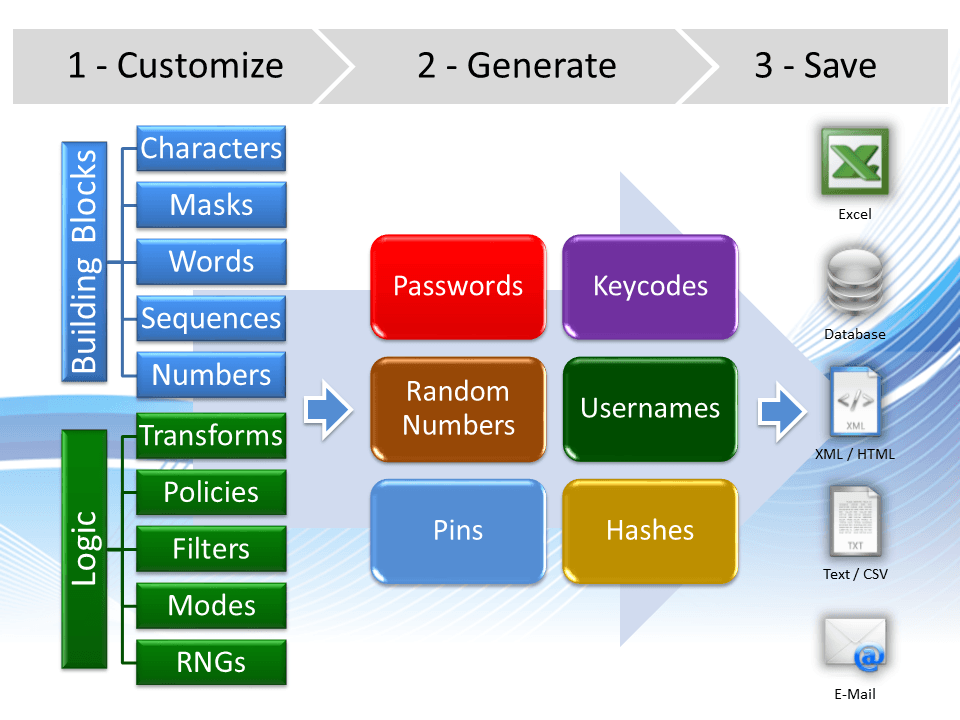
Choose & Customize Building Blocks
Character Groups
- Lowercase: a b c d e …
- Uppercase: A B C D E …
- Digits: 0 1 2 3 4 …
- Symbols: . , ; : / …
- Vowels: a e i o u …
- Consonants: b c d f g …
- Up to 9 user-defined character groups
String Literals
- 4 built-in text dictionaries
- Up to 9 user-defined text dictionaries
- User-defined data-bound dictionaries to use data from databases
Sequences
- Decimal: 01, 02, 03, …
- Hexadecimal: …, 9, A, B, …
- Binary: 00, 01, 10, …
- Alphanumeric: …, KZ, L0, L1, …
- User-defined
Configure Options & Logic
Character Policies
- Consecutive: abcdef, 123456, …
- Keybaord-Consecutive: qwerty, asdfgh, …
- Duplicate: start, FINISH, …
- Repeating: password, Hello!, …
- Similar: 0 o O 1 i I l …
Text Transformations
- Replace, insert, delete
- Reverse, sort, shuffle
- Change letter case
- Morse code, leet speak
- Change number base (radix)
- Generate hashes
- Many others
Filters
- Common passwords filter: qwerty, 012345, asdfg, password123, …
- Dictionary-based weak password filter
- User-defined, custom filters
Select Generation Mode & Generation Options
Generation Mode
- Basic - for simple passwords
- Advanced - for more complex passwords with more control
- Number - for generating integer and floating point random numbers within specific range or matching specific distribution
- Mask - for advanced, template-based code generation based on predefined pattern
- Pronounceable - for easy to pronounce random strings and made-up generated words
Random Number Generator
- XOR-Shift 128
- Mersenne Twister MT-19937
- Additive Lagged Fibonacci ALF
- System Default
- FIPS-Compliant Cryptographically Secure RNG
Generation Options
- Quantity - up to 100 000 000 (or more if backed up by file)
- Length
- Username generation
- Duplicate checking
- Hash generation: SHA, MD, CRC, …
Generate Passwords, Numbers, Keycodes…
Passwords
- yc48Na6EC5
- ак5жй22ГлD45
- q7_Xp&1o?j5l
Keycodes
- A15K-003-1Z5XCG
- +1(800)123-0001
- sn0300001@svr02
Numbers
- 386723987
- -128.09
- 1F2A300D
Usernames
- billy64
- Amy_flower
- James007@UK
Save / Export Output
Excel
Database
XML/HTML
Text/CSV
Encrypted
List
Screenshots Tour
This is a brief screenshots tour of a product. It highlights some of the major product features. For more detailed information on product features, please see video demonstrations and check product features section.
Character Groups and Policies
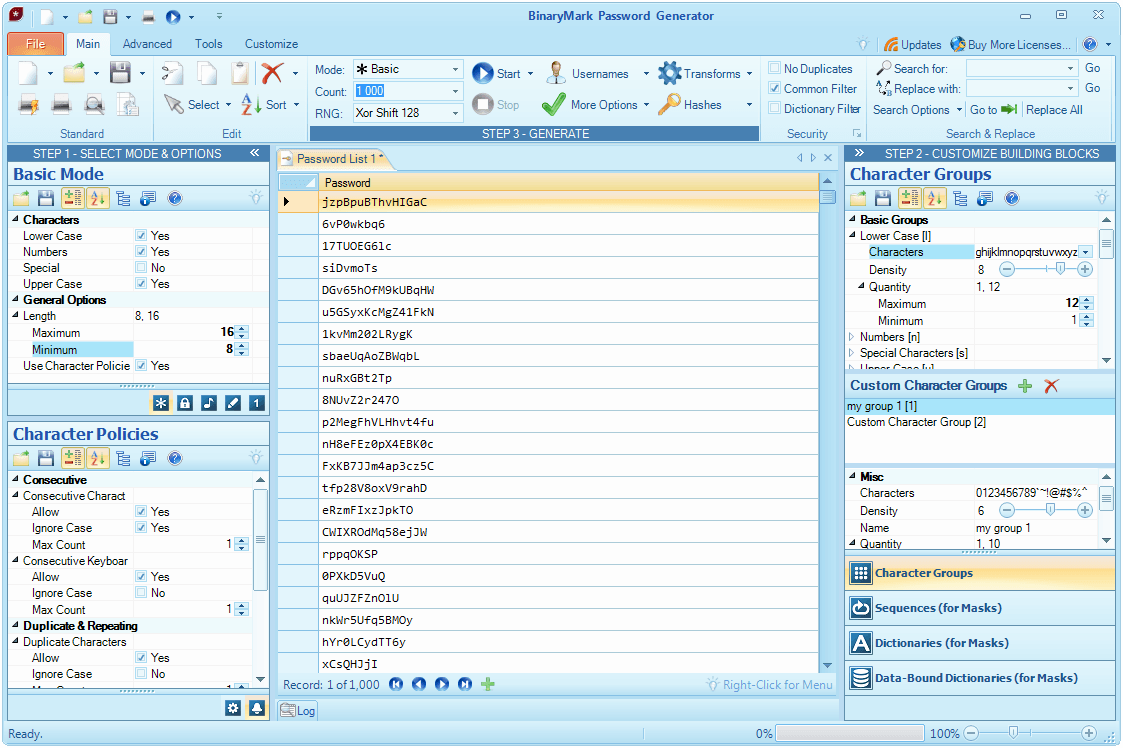
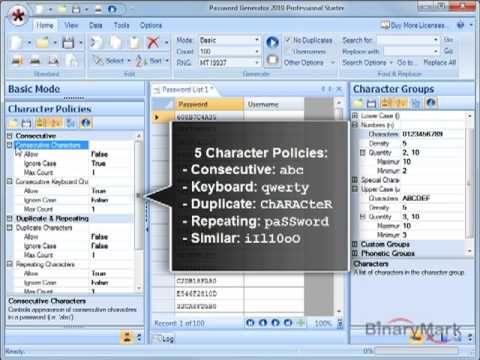
You use character groups to control which characters can appear in your passwords. With character policies you can eliminate possible weaknesses in your passwords, like the presence of duplicate or consecutive characters.
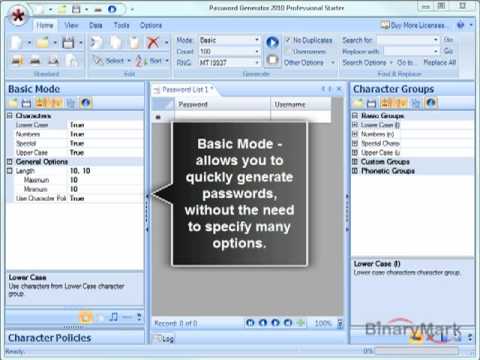
In Basic Generation Mode you can generate secure passwords with minimal required customizations.
Generate Advanced Passwords
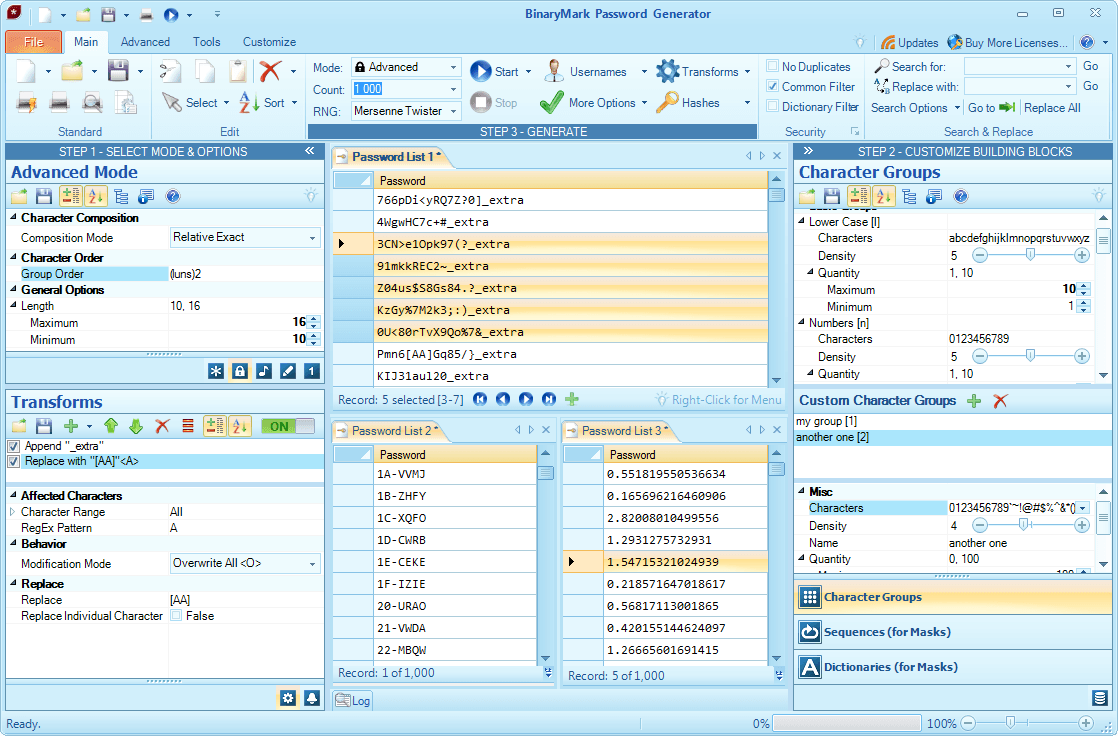
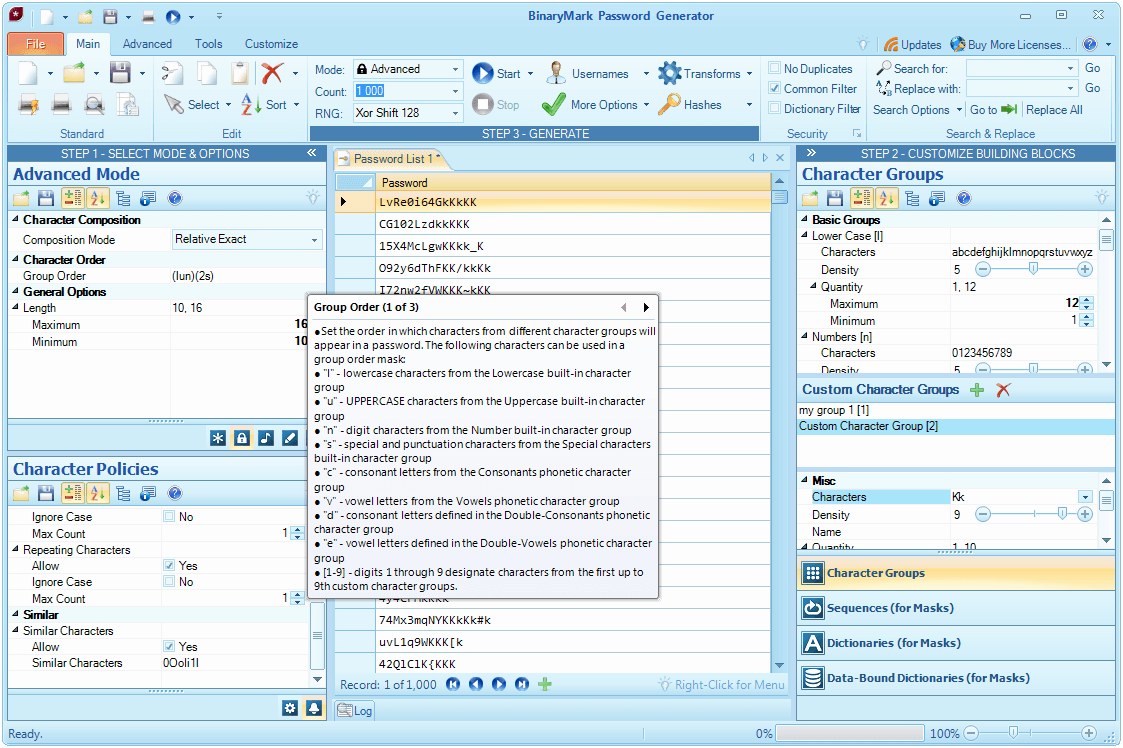
In Advanced Generation Mode you can control more aspects of the generation process. You can define and use custom character groups, as well as relative order of characters using group order mask. In addition you can control the frequency of appearance of all characters.
Note on the screenshot the group order mask used, the characters in the second custom character group, and resulting passwords.
Generate Pronounceable Passwords
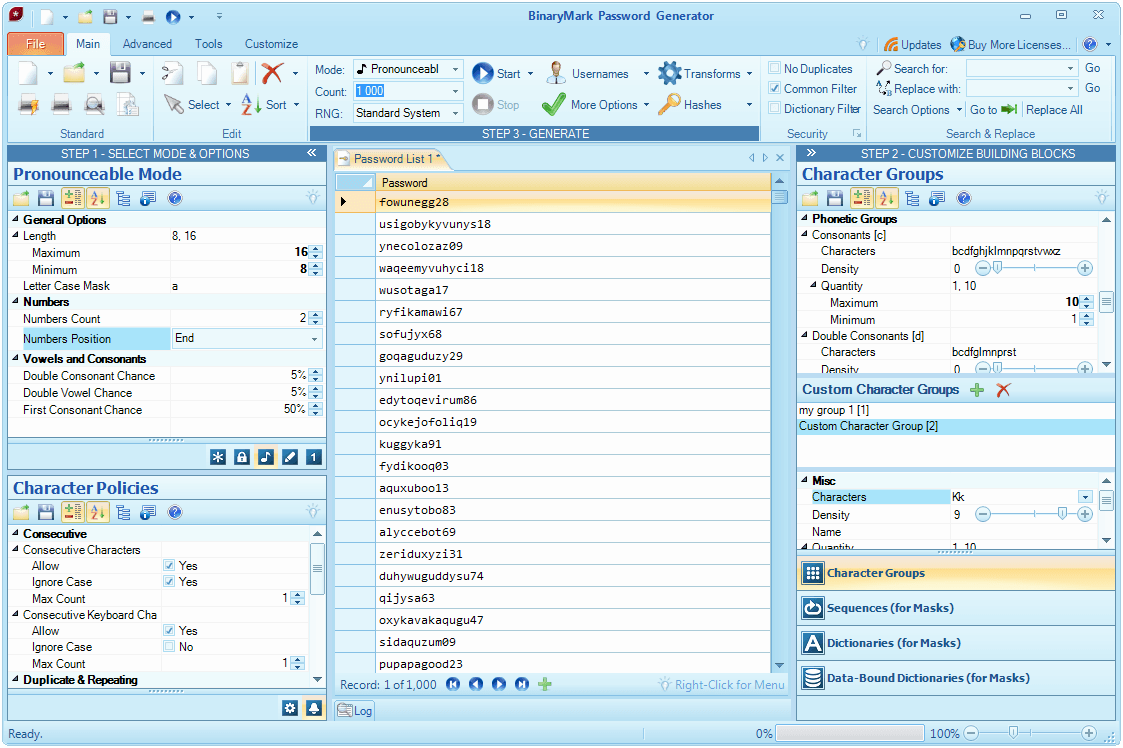
You can generate easy to remember, pronounceable, but secure passwords in Pronounceable Generation Mode. You can control which characters will be used using special phonetic character groups where you can select allowed consonants and vowels. In addition you can control other options like the chance for a double consonant or vowel to appear as well as presence of numeric digits.
Use Masks for Keycodes and Usernames
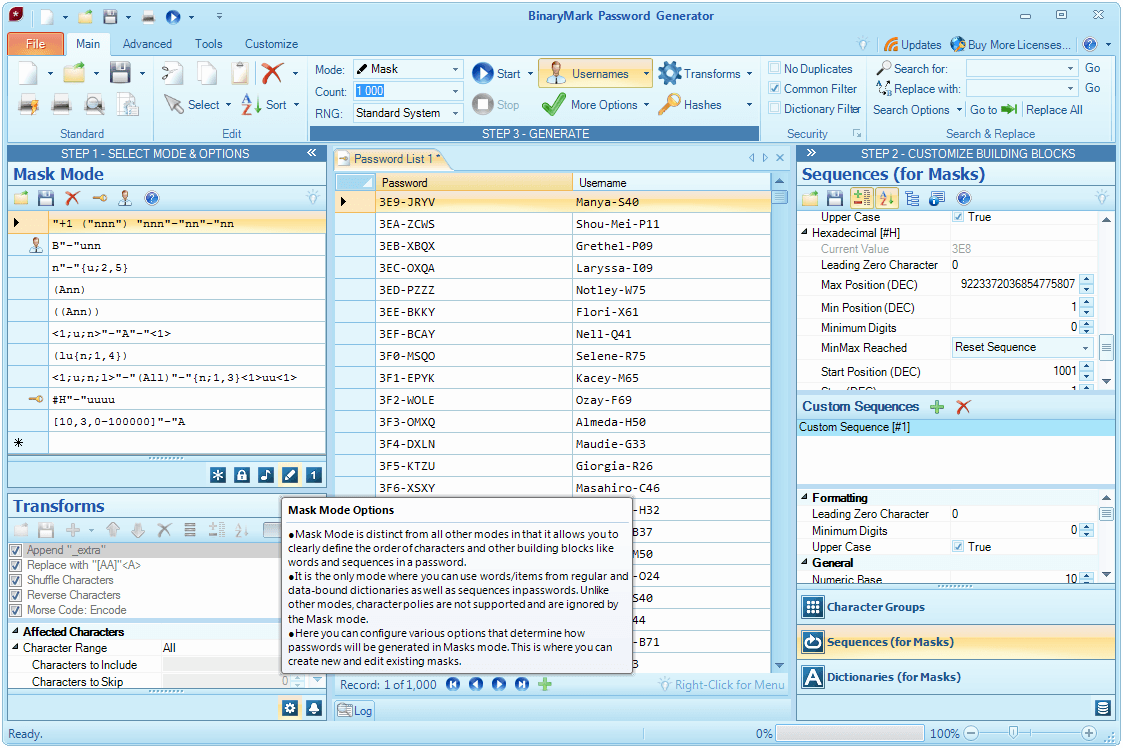
In Mask Generation Mode you can use more advanced masks to generate keycodes, serial numbers, pins, and usernames that must follow a particular pattern with explicit control for character placement.
In addition, certain "building blocks" like "words" from dictionaries, strings from databases (defined in data-bound dictionaries), and sequences can only be used in Mask generation mode.
Note the generated passwords and usernames and their respective masks on the left (usernames are always generated according to a specified mask). Also note the #H hexadecimal sequence in the password mask, its values in the generated passwords, and its definition on the right.
Generate Random Numbers
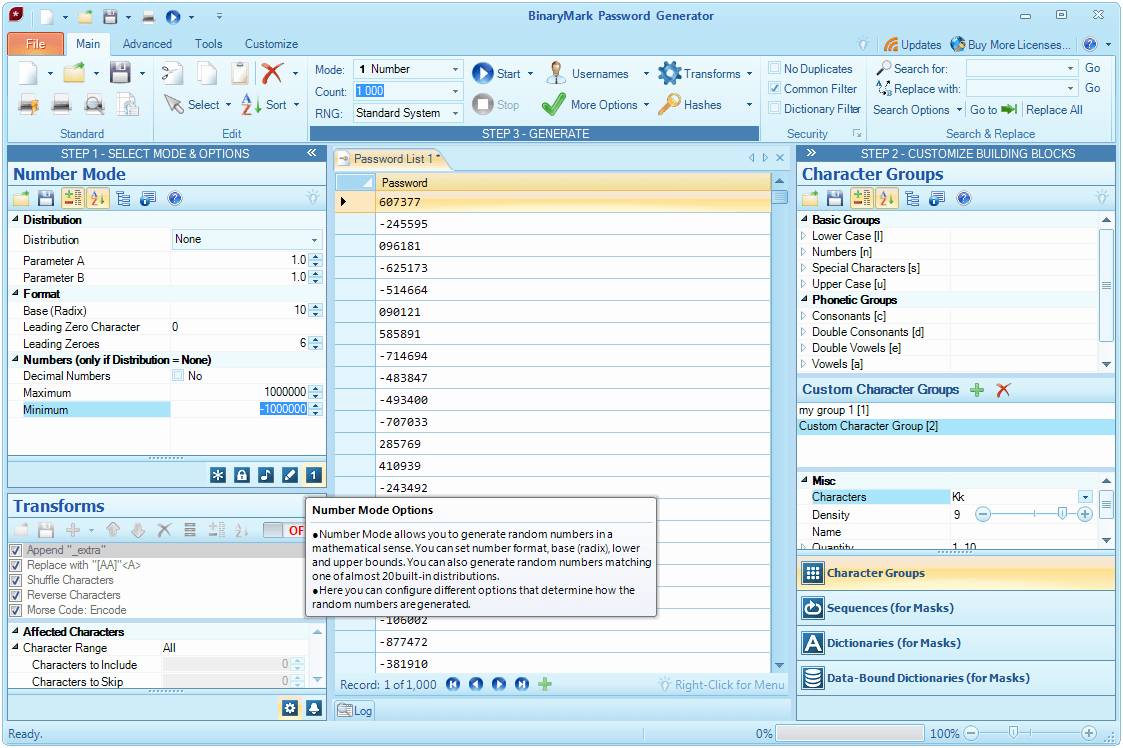
In Number Generation Mode you can generate whole and fractional random numbers that either fall within a specified range or match a given statistical distribution. Negative numbers can be generated by specifying the minimum value less than zero.
You can also specify the numeric base (radix) of the generated numbers.
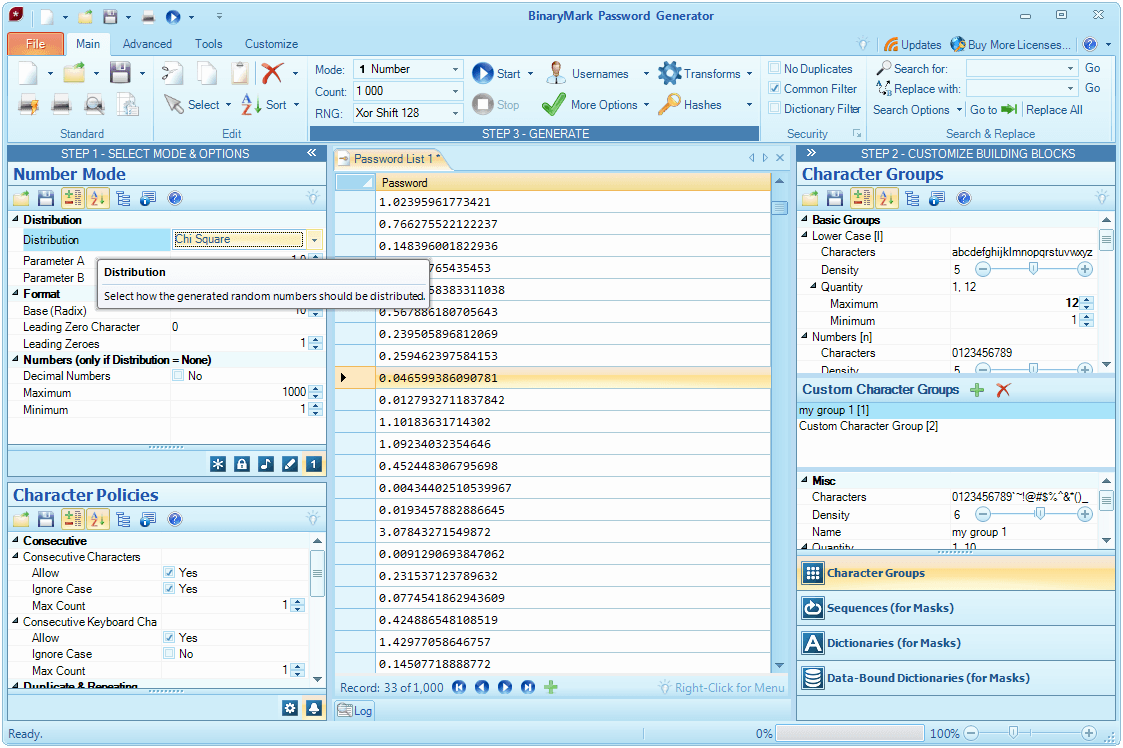
Statistical Probability Distributions
In Number Generation Mode you can generate random numbers that match one of 17 built-in statistical probability distributions, so that generated numbers will be distributed according to distribution's probability density function.
The following continuous distributions are supported: Normal / Gaussian, Beta, Chi Square, Student-T, Cauchy, Chi, Continuous Uniform, Exponential, Gamma, Laplace, Log-Normal, Pareto.
The following discrete distributions are supported: Bernoulli, Binomial, Discrete Uniform, Geometric, Poisson.
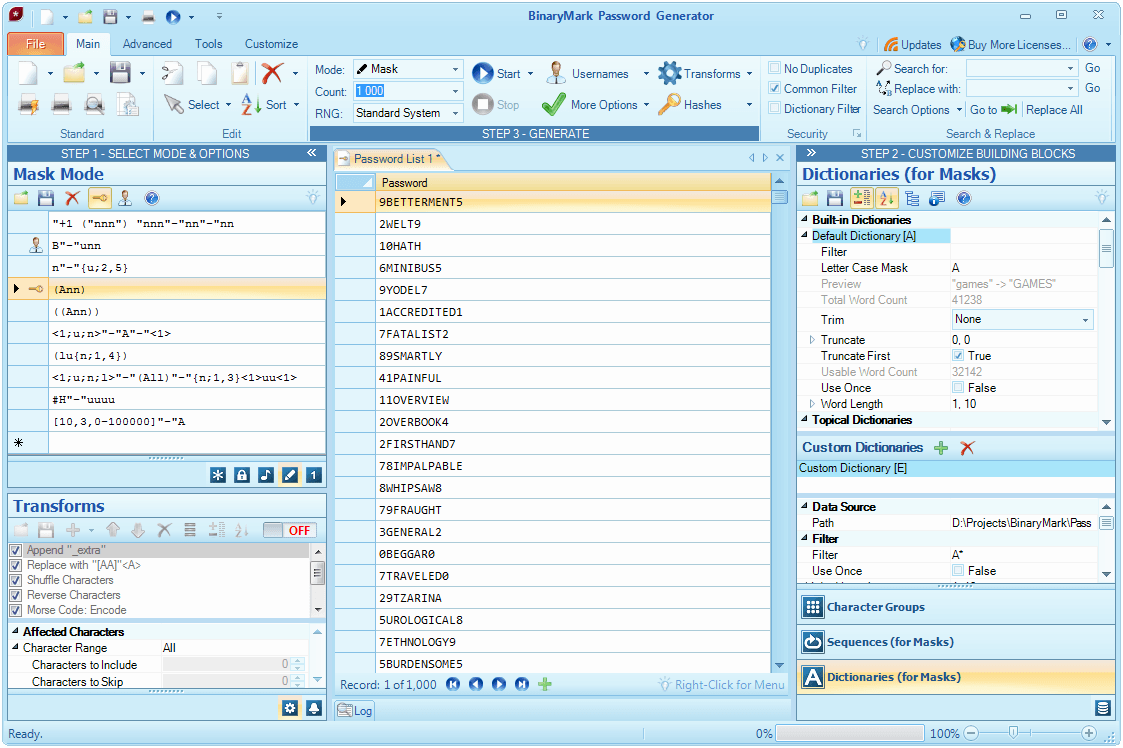
Use "words" and String Literals
When generating passwords in Mask Generation Mode or when generating usernames you can use literal strings and words taken from either built-in dictionaries or custom data sources (custom dictionaries and data-bound dictionaries).
A custom data source can be a simple text file or a database from which text data will be retrieved according to the settings and filters you specify. Before being used, this data is then further transformed according to the options you specified in a "dictionary" that manages the custom data source.
Note on the screenshot how the words from built-in dictionary A are used in the generated passwords according to the specified mask and dictionary settings.
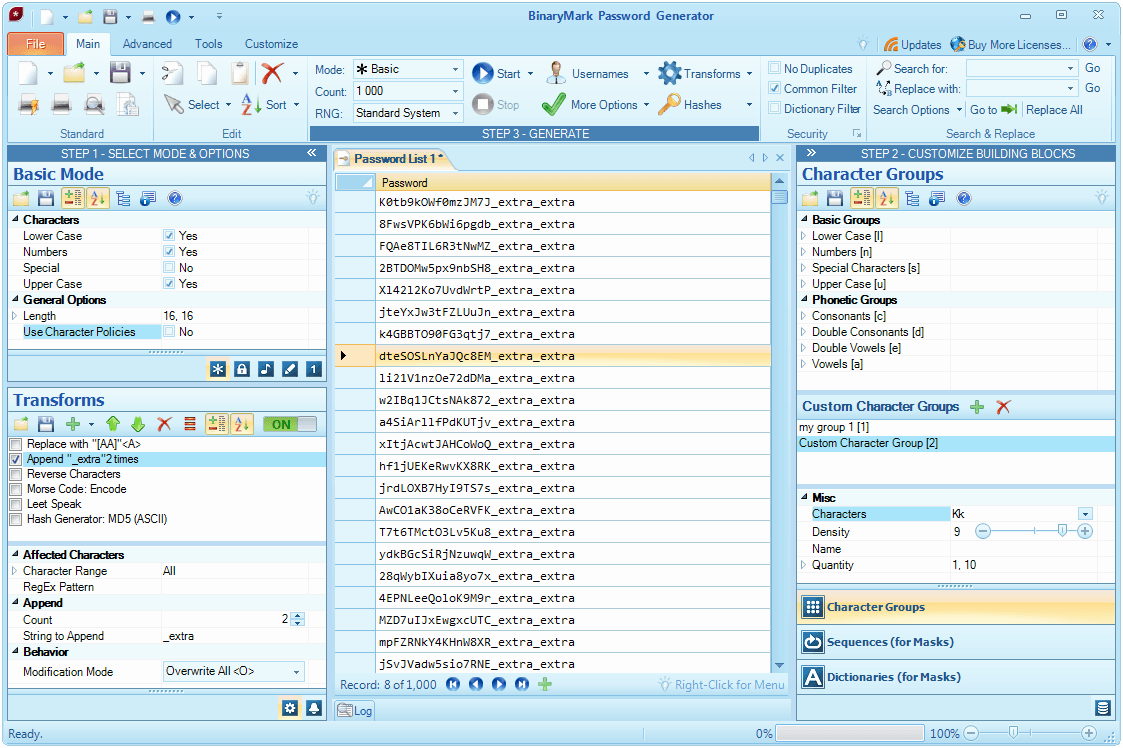
Manipulate & Transform Passwords
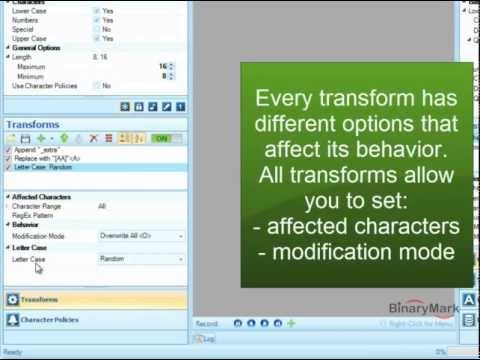
Using Text Transformations (transforms) you can further manipulate, tweak, and modify generatedpasswords and usernames, so that you are completely satisfied with the final result.
For example, you can: replace, insert, append, and delete strings of text or individual characters; convert generatedpasswords or only specified characters to Morse Code, Leet Speak, Base-64; manipulate characters - reverse order of, shuffle, change letter case; etc.
Transforms will be applied as long as they are enabled and as long there is at least one active transform present in the transforms list. Transforms can be applied in any generation mode, to bothpasswords and usernames, and are always applied last, but before any filter and duplicate checks are performed.
Note on the screenshot active Append Transform, its options (append 2 copies of string _extra), and its result on the generatedpasswords.
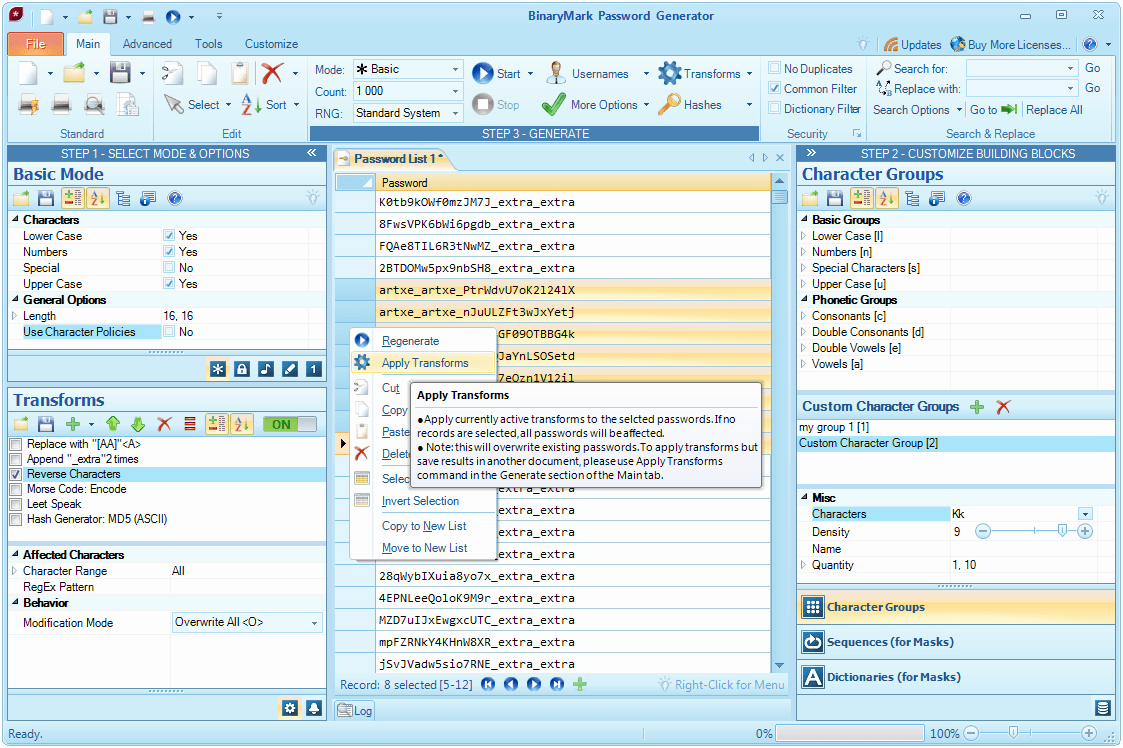
Apply Transforms to Already Generated Passwords
Transforms can be applied in two ways: first, they can be applied automatically when you are generatingpasswords or usernames; second, they can be applied manually later to already generatedpasswords.
To apply transforms manually, simply selectpasswords to which you want to apply transforms, right-click on the selection, and click Apply Transforms.
Note the active Reverse Characters Transform and its result on the selectedpasswords (as compared with the previous screenshot).
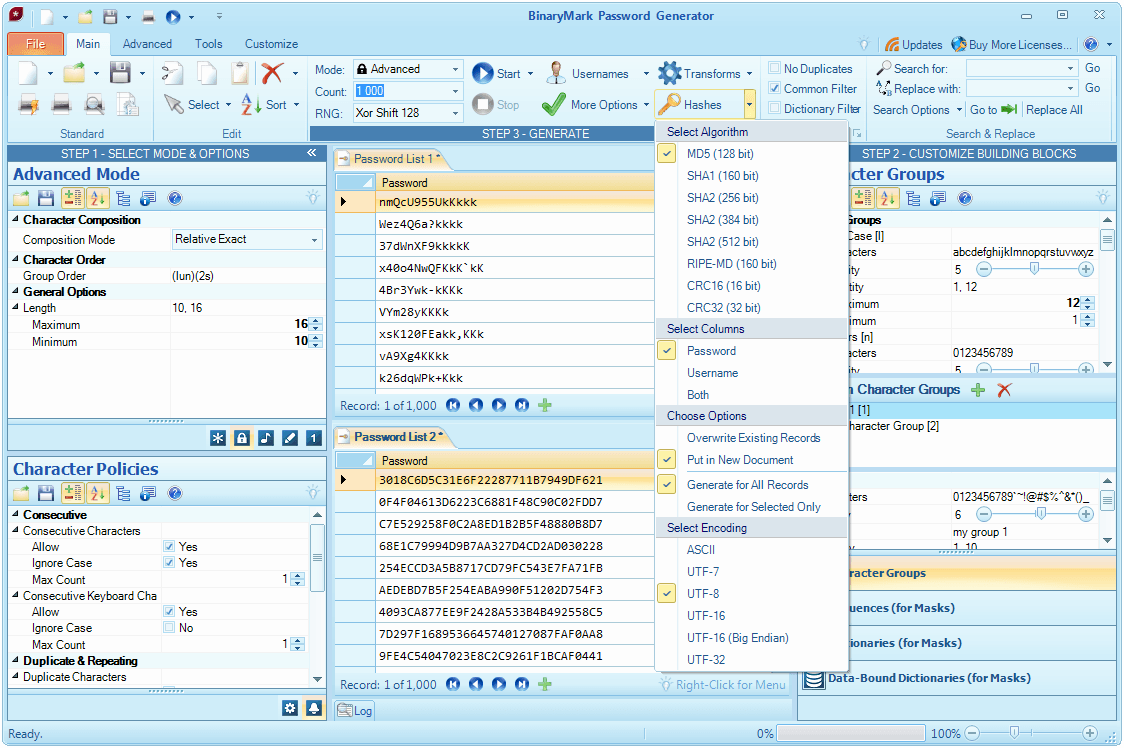
Compute Hashes
You can easily compute hashes of generatedpasswords and usernames using specified hashing or checksum algorithm. The following hash / checksum algorithms are supported: SHA1, SHA2, MD5, RIPE-MD, CRC.
You can also specify the encoding in whichpasswords should first be saved, before a hash can be computed on the actual byte representation of the encodedpassword.
Also note the usefulness of the MDI - Multiple Document Interface that allows you to work with several documents at once, as shown on the screenshot.
Core Features
Note PROmeans feature is available in Professional or Server Edition (not in Standard Edition).
SVRmeans feature is available in Server Edition only.
Note The term password means any random string that can be generated like: passwords, keycodes, numbers, pins, usernames, etc.
Security Features
Data Features
Convenience Features
Video Demos
See Password Generator in action, discover its powerful features, and learn how to use them by watching video demonstrations below!
Note Some demos showcase 2010 version of the product, however everything shown there still applies to the latest version as well!





What's New in Password Generator
- New Number Generation Mode - Now it's easier than ever to generate random numbers that must be within a particular range or should match a particular statistical distribution.
- Random Number Distributions - It is now possible to generate random numbers that will match a particular statistical distribution. Almost 20 built-in distributions are available: Normal, Geometric, Uniform, and many others.
- Tweak Passwords with Transforms - A whole new level of fine-tuning generated passwords and keycodes has been introduced: transforms. With transforms, you can tweak generated passwords in various ways: you can replace, insert, and delete strings; convert to Morse code or Leet speak; change order of characters, and do many other manipulations.
- Windows 8.1, 10, & Server 2012 R2, 2016, 2019 Support - Complete Windows 8.1, 10, Windows Server 2012 R2, 2016, 2019 compatibility and support.
- Generate Directly to File - You can now generate passwords directly to a file on disk, completely bypassing User Interface. This not only speeds things up, and frees system resources, but allows you to generate truly large number of passwords: exceeding tens of millions!
- Office-Like Ribbon User Interface - A much improved, cleaner, and smoother UI similar to Microsoft Office with detailed tool tips makes various features even more accessible, making the product easier to use.
- User-Friendly Property Inspectors - We have greatly improved the ease of use of the numerous property grids (inspectors) through which you can access and change various options. For example, fields accepting numeric input feature spin-wheels and trackbars for easier input.
- More Accessible Custom Resources - Now it is very easy to create, edit, and remove custom character groups, sequences, and dictionaries. Unlike in previous versions, all these tasks are now intuitive and can be done with a click of a button!
- Better Support for Hashes - We have extended support for hashes by adding new hash and checksum algorithms: RIPE-MD and CRC. In addition, it is now possible to select text encoding that should be used in hash calculation. Also, minor additions have been introduced in regards to hash generation and management.
- Detailed Tooltips in Property Grids - Now when you move your mouse over any setting or option in the property grid, a detailed tooltip will appear explaining what the setting does and how best to use it.
- Improved Weak Password Filtering - We have improved algorithms that detect and filter-out weak passwords!
- User Interface Tweaks - Various improvements to the User Interface make the product easier to use and features more accessible.
- Performance Improvements - Of course, we have made numerous performance improvements that will result in smoother product operation and faster password generation as well as startup times.
- Bug Fixes - Various small bugs and issues have been addressed, resulting in better overall product quality, stability, and security.
- Much more!

- Office 2007 Ribbon User Interface - UI similar to Office 2007 with detailed tool tips puts all the important controls at your fingertips, improving ease of use.
- New Basic Generation Mode - If all you want is just quickly generate strong passwords, without having to go through many options, Basic Generation is there for you.
- Up to 8X Faster - The generation speed has been greatly improved, in some cases you can see improvements of 800%
- 4 New Random Number Generators - While all the previous versions used just one internal RNG to generate randomness, you now have the choice of using any of the 5 available RNGs - some are faster but less secure, others are slower but much more secure (generate better randomness).
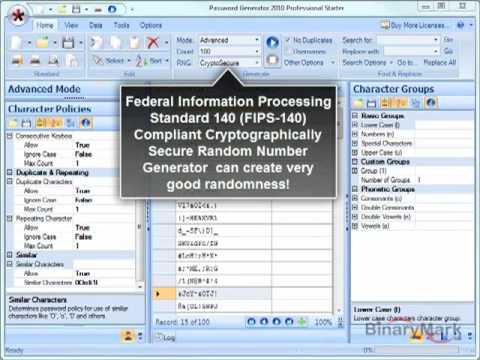
- Cryptographically Secure RNG - Cryptographically Secure RNG makes it easy for you to follow strict password generation guidelines, as this RNG is compliant with FIPS-140 standard and can thus generate strong, standards-conformant passwords
- Character Policies - Character Policies are an entirely new feature that makes it super easy for you to make your passwords conform to various elements of your password policy. Maybe you are not allowing duplicate characters, like 'baDpassworD', or repeating characters like 'paSSword', or consecutive characters like 'qwerty' or 'abc'. By simply turning on and customizing appropriate character policies you can now easily eliminate unwanted elements in your passwords.
- Unicode - Non-ASCII characters - Ever wanted to have non-ASCII characters in your passwords? That's not a problem any longer, as the product now offers full Unicode support, so your passwords / codes, in addition to Latin characters, can have any non-Latin characters in them as well.
- Sequences & Sequential Codes - Sequences now allow your codes to have sequential elements in them. There are 4 built-in sequences: binary, decimal, hexadecimal, and alphanumeric; but you can also define up to 9 custom sequences!
- Password & Username Hashes - Now you can generate and save / export hashes for the generated passwords and usernames: SHA1, SHA2, MD5.
- Remove duplicates command - Now there is a dedicated command that lets you easily remove duplicate entries. This is helpful if you either generated a list of passwords without turning duplicate elimination on, or exported passwords from outside and thus want to make sure they are all unique.
- New Phonetic Character Groups - We have added new built-in character groups like vowels and consonants.
- Improved Advanced Generation Mode - We have improved Advanced (formerly Password) Generation Mode: the same character group in a character order mask can now be referenced multiple times - ex: 'lunls' (lower case characters (l) will appear at the beginning of a password, and towards the end).
- Masks: Range Operator [A-Z] - You can now use this operator to pick a random number within a certain range, in a numeric base of your choice, and format it as you wish. For example [16,3,0-FFF] may produce something like 0AB.
- Masks: Random Distribution (...) - You can now use it to either randomly distribute elements (i.e. words from dictionary, characters, sequences, random numbers), or individual characters (in this case, of course, the word will be broken up).
- Masks: Literals Operator "" - Now use Literals Operator whenever you want to have a constant string in your password.
- Masks: Much improved performance
- Password List Encryption - You can now save password lists in an encrypted form, so they are fully protected.
- Double Vowels & Consonants - When generating pronounceable passwords you can now assign probabilities for appearance of double vowels and consonants.
- Improved weak password filters
- Much more!

Customization & Extensibility
We can help you integrate Password Generator with your existing business logic, extend product's functionality, or otherwise customize it to meet your requirements!
Development Library
Development Library that contains all password generation functionality of this product is available separately for purchase as a COM-Compatible .NET DLL that you can use to leverage Password Generator's functionality in your own projects.
Please contact us to get Development Library. We will also be happy to answer any questions you may have regarding licensing, pricing, integration, and other issues.
Let Us Customize Password Generator for You!
If Password Generator is not exactly what you are looking for, we can customize it for you so it specifically meets your needs! It can be done at a low cost to you, as Password Generator provides a solid foundation upon which new features can be effectively added by our experienced developers to quickly create a customized, professional solution that meet your needs!
Keep in mind that contracting us to customize the product will be much cheaper and faster than hiring a programmer or doing the work with your own resources, as we have extensive experience in the area of custom development, and what's more - Password Generator is a solid foundation upon which all the extra functionality that you desire can be built. More than 10 000 man-hours and over 100 000 lines of code went into the creation of Password Generator, so recreating even part of its functionality from scratch would require lots of resources.
Do you need customization?
- The product does not exactly meet your needs?
- Some feature you would like to use is not in the product?
- Would you like to add another action or operation?
- Need more options and customizations?
- Want to integrate the product with your existing business logic?
Custom Development Benefits
- No programming skills are required - we do everything for you!
- Low-cost professional development by experienced team
- Fast development because it leverages existing product and infrastructure
- Professional User Interface and familiarity as new features are integrated into existing product
- Royalty-free, flexible licensing model
Look no further! Contact us to request a quote and start custom development!
Useful Tips
Reasons to Use Passwords
There are many reasons to use passwords. Here are some common reasons to use them:
- to prevent unauthorized access to important information
- to guarantee security of personal information
- to prevent unauthorized access to user accounts, such as computer and email accounts
- to be able to use various Internet services securely
Why Only Random Passwords are Secure
To begin discussion about the importance of random passwords, it must be said that it is a myth that frequently used passwords or passwords that are based on personal information are secure. The fact is - they are not. Furthermore, even if you are to use some free random password generators online, you will be far from being safe, as those random password generators lack sophisticated security and randomization technology required to generate truly random passwords. So why do people rely on the passwords they make up in their heads or the ones generated free online tools? Here are the common reasons why people might use such passwords:
- They are easy for users to remember, because they include personal information about the user.
- They consist of known words that can be found in many hacker password dictionaries.
- They contain number or letter sequences or letter-to-number substitutions, such as E for 3 or O for zero.
Look through the above list of reasons why people use "easy passwords" and think do they really worth the risk of someone being able to hack into your user accounts and steal or even delete your information? The answer is No, - it does not worth that risk!
Realizing that there is a need for a new generation of random password generators that will have advanced randomization methods and security checks, we set to work on Password Generator. The result is that we created user-friendly, easy-to-use, and yet professional and customizable tool that generates very strong and secure random passwords - truly random passwords if you wish.
Truly random passwords have one major advantage compared to other passwords (those that you make up in your head for example). They are simply more secure and reliable, as it is impossible to guess them, and extremely difficult to crack.
Look through the following advantages of random passwords, generated by Password Generator compared to regular passwords:
- Advanced randomization technology ensures that the password is unique and that it is impossible to guess.
- Automated cracking programs will have hard time trying to crack passwords, because passwords are composed of lower case letters, upper case letters, numbers, punctuation symbols, and other characters, that are distributed randomly in the password.
- Because of frequent alternation of vowels and consonants, it is possible to generate passwords that are very easy-to-remember, but yet that are very safe.
Few Password Tips
We suggest you review the following password tips, as there is not a single password generator that will protect you, if for example you write down your passwords and live them on your desk.
- Others can hear you give a password to someone you trust. So do not say your password aloud.
- Someone looking over your shoulder can discover a password.
- Don't keep a copy of your password in a desk drawer, on a monitor, or under a keyboard.
- Your password is yours alone. So don't share it with anyone, including supervisors, personal assistants, or IT personnel.
- Never write down your password. You wouldn't write down your PIN number for your ATM card, would you?
- Do not e-mail your password to a co-worker, or offer anyone hints about what your password might be.
Awards & Reviews