
Color Picker Pro
Grab pixels from anywhere on your screen and convert colors between 17 models in 50+ formats!
NEW!
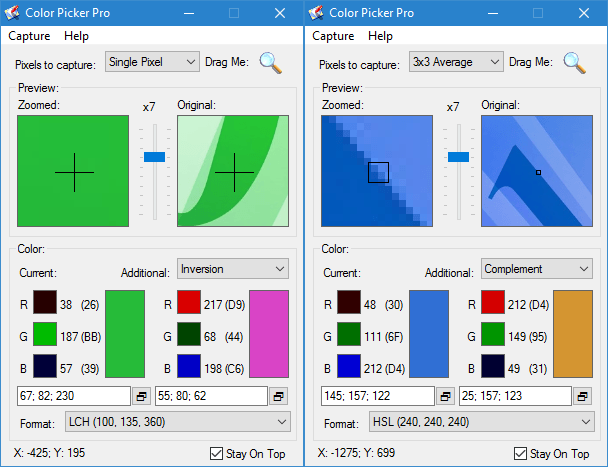
Grab pixel colors from anywhere on the screen, including dynamic and 3D content!
Convert colors between 17 Color Spaces: RGB, HSL, HWB, CIE Lab, LCH, XYZ, LMS, YUV…
Display & Copy colors in 50 Formats: hex, numeric, percent, CSS, native…
Grab pixel colors using mouse for crude selection and keyboard for precise control!
Generate 100+ additional color variations: Contrast, Inversion, Brighter, Warmer, Grayscale, …
Interactive Zoom with preview shows exactly which pixel(s) you are capturing.
Top Features
Whether you’re picking the exact shade of a brand logo, converting a color to match a print specification, or generating a palette for a UI design, Color Picker Pro a lightweight yet powerful tool that delivers the precision, flexibility, and speed you need! Learn about some of its key features and see them in action with animated screenshots below.
Screen Pixel Color Grabber

- Easily pick pixel colors anywhere on your screen. This includes even dynamic content like 3D. In addition, you are not restricted to picking just a single pixel, you can pick the average color of several pixels within a desired square area.
- Most color pickers work by automatically capturing the color of the pixel right below your mouse pointer as you move your mouse. This is known as mouse-free picking mode. While this may be useful at times, frequently you may need to perform certain operations with the captured color, once it has been picked: such as copying it to clipboard or changing its format for example.
- However this is not possible if the program picks colors continuously as you move the mouse. That’s where mouse-drag picking mode comes in. In this mode, you click on the special button inside the program and then drag the mouse pointer to a pixel you want to capture, and once your mouse pointer is over the desired place, release the mouse button to pick the color.
- For even more control, you can use keyboard arrow keys for pixel-perfect color grabbing.
- There is a built-in dual preview that lets you see precisely what pixels you are picking. The preview displays a small portion of the screen where the mouse is located in its actual and enlarged (zoomed-in) views. This way you can not only easily pick the color of the right pixels, but also see fine details of your screen, which you would otherwise not be able to discern.
Built-in Color Converter
- 17 Color Models: The app fully supports displaying colors and converting between 17 color spaces: RGB, CMY; cylindrical - HSL, HSB/HSV, HSI, HWB; CIE - L*a*b* (Lab) and its cylindrical representation LCHa*b* (LCH), L*u*v* (Luv) and its cylindrical representation LCHu*v* (LCHuv), XYZ, xyY; LMS; Luma-based - Y'CbCr (YCbCr), Y'DbDr (YDbDr), Y'UV (YUV), Y'IQ (YIQ).
- Built-in Color Converter lets you convert between all 17 supported color spaces: RGB, CMY; cylindrical - HSL, HSB/HSV, HSI, HWB; CIE - Lab, LCHab, Luv, LCHuv, XYZ, xyY; LMS; Luma-based - Y'CbCr, Y'DbDr, Y'UV, Y'IQ. You can convert between up to 3 different color models at the same time!
- 50+ Color Formats: You can view the value of any color or copy it to clipboard for any of the 17 supported color spaces in more than 50 color formats. Simply select the desired color model or format from the drop-down list, and immediately see the color value in the desired format!
- Common Color Formats: Web-Ready CSS/HTML/Javascript, Photoshop, OLE,...
- Numeric Color Formats: Decimal, Hexadecimal, Floating point, Percentages, byte-based
- Native Color Formats: display color component values using their full range specific to the chosen color model, and may include negative values.
- You can customize various format details such as: upper/lower-case, numeric precision, number of decimals, separator characters, unit suffixes, component name prefixes.
100+ Color Variations

- Easily design custom palettes and swatches with program's built-in color variations generator that lets you pick from more than 100 color variations of a chosen color!
- Common variations like: Inversion, Contrast, Complement...
- Opposing varieties like: Lighter / Darker, Brighter / Dimmer, Warmer / Cooler, More Saturated / Less Saturated, Whiter / Blacker - all with 10%, 25%, 33%, 50%, 75%, 90%, 2X, 3X.
- Grayscales: BT.601, BT.709, RMY, HSB Brightness, HSL Lightness, HSI Intensity, CIE Lab Lightness, CIE XYZ Luminance, avg(RGB), min(RGB), mid(RGB), max(RGB)
- Hue shifts in both HSL and CIE LCH by well-defined amounts like +/-30°, +/-60°, +/-90°, +/-120°, +/-150°, 180°, and 270°: Complement, Analogous, Triadic, Tetradic
- Any color models can be used with any color variation or format!
Other Features
- Pick colors anywhere on the screen, including dynamic and certain DirectX content
- Pick either single pixel color or average color of a square of pixels of a given size
- Zoom in on any screen area to capture hard‑to‑see pixels using interactive magnifier.
- 2 Mouse Capture/Picking modes: either move mouse pointer freely, or activate picking only by dragging
- Keyboard grabbing mode for extra precision and control
- Support for 50+ color formats: Numerical (OLE & Win32), RGB, RGB%, HSL (0-240), HSB (360 100 100), CMY, CMYK, CIE Lab, CIE Luv, LCH, CIE XYZ, Yxy, YIQ, YUV, YCbCr, YCC, YPbPr, YES, Hexadecimal, HTML, HTML color names, Extended HTML color names, Visual Basic, C++, Delphi, Photoshop
- Convert between more than 17 color spaces: RGB, HSL, HSB, CMY, CMYK, CIE Lab, YIQ...
- Generate 100+ color variations: Color Complement, Color Inversion, Desaturation color, Grayscale equivalent, Web Safe equivalent, Contrast color, Darker, Lighter, More Saturated, Less Saturated...
- Program can remain always visible by staying on top of other windows
- You can control how the program formats color values using various settings, like the value separator symbol, decimal precision, etc.
- Program can automatically copy the value of the picked color to clipboard in the desired format
- Full clipboard support - copy and paste operations are supported
- Many options and customizations
- Much more!
What You Can Do
These are just a few things that you can accomplish with Color Picker Pro:
- Pick single colors or color averages from anywhere on your screen
- Effortlessly convert colors between color spaces and different formats
- Easily see magnified parts of your screen
- Quickly find color complements, inversions, black & white equivalents and other variations
- Much more!
What's New in Color Picker Pro
LATEST

- Built-in Color Converter - lets you easily convert between 17 color models in 50+ different formats. You can fine-tune each component independently with numeric input fields that allow you to enter exact values.
- Built-in Color Picker - lets you easily visualize relationships between various color components in any of the 17 color models using interactive visual sliders that allow you to precisely find the desired color.
- 6 New Color Models: HSI - Hue-Saturation-Intensity, HWB - Hue-Whiteness-Blackness, LMS - Long-Medium-Short, xyY, YDbDr, CIE LCHuv - cylindrical version of CIE Luv model
- 90+ New Color Variations: Warmer, Cooler, Grayscales, Hue Shifts - Triadic, Qudratic, Tetradic, many others!
- Precise keyboard control using arrow keys to more easily pick pixel colors on the screen
- Dark Mode support (requires Windows 10 1809 or later)
- Windows 11 support
- Improved User Interface with better icons, tooltips, and customizations
- The program now remembers window size, position, selected color variation, models, and formats
- Performance enhancements
PREVIOUS
- Color Variations allow you to automatically generate variations of the picked color: Contrast, Inversion, Brighter, Darker, etc.
- 5 New Color Models: CIE Lab, CIE LCH, Luv, XYZ, YUV.
- More options have been added, allowing for easier customization
- Windows 10 support
- Improved User Interface
- Lots of performance and stability improvements
